How to prepare text and content for a website
10.11.2015
Paragraph §12 a step-by-step guide for opening an online store .
How I prepare texts for publication on the site and in the social. networks.
For the text to look beautiful on the site, it must be decorated. It is advisable to decorate texts not only with tags, but also according to the rules of the Russian language, with beautiful quotes, correct dashes and hyphens. And in this place you get the feeling that I am talking about some unrealistically complex tricks, it becomes sad and the mouse wants to close the page .. Wait, everything is not so! See what's next =)
Right now I'm not writing this post in MS Word, not in Notepad, although it's a good option, but I'm writing this in the tool " Reformer " on the website of Art. Lebedev Studio. They have a simpler option - " Typographer ", it is better to use it for social networks and quickly ... And for a full text it is better to use the "Reformer". How do you do this?
We start by simply putting the icon on the "Regular paragraph" at the top right:

Reformer panel
How to style an h2 heading
To style an h2 heading, just write the text and click the middle "Heading", it will look like this:

Reformer panel, select Heading h2
You can style a quote, select the text and click "Quote":

Reformer panel, make out a quote
What's next?
When we format all the text, for the sake of interest, you can click the second from the bottom button "Source HTML", then all our text will appear as text typeset for publication:

Reformer panel, see HTML source
Us it remains to take the last step, the most important one. To make the text look beautiful, you need to add the correct text tags to it using the "Typographic" button:

Reformer panel, add text tags
After clicking this button, all text will be transformed. Compare this text before and after processing:

Text before typography
Yellow inserts appeared, and in the source code we will see many additional tags:
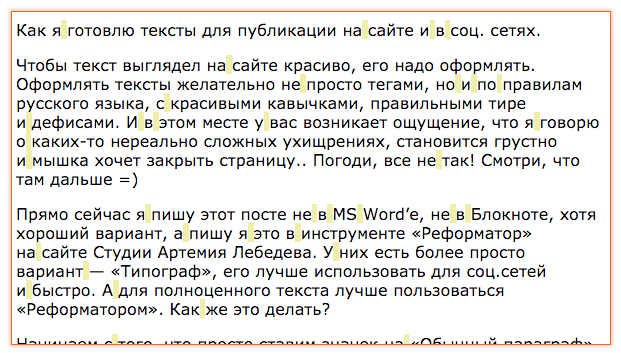
Text after typography

Text after typography in HTMl- form
To paste the text to your blog, you need to copy everything in HTML mode and also in the code mode, paste it into your blog in LJ or in Wordpress.
To paste the text to your blog social network, just select the entire text in the Reformer at once, and copy it into the post. Just remember that lists do not work there.
And if I already have a lot of texts?
I need to re-format them, it's a long way, but it must be done. It may turn out that they are already crooked, then we need to do this.
Go to our post with the text, switch to the mode of working with html code and copy everything as it is to the clipboard. Then we go to the Reformer, go to the "Source HTML" mode, insert the content and see what we have.
If we see that there is a hell of a hell, boldly click the "Clear HTML" button on the right, return to normal editing mode and start adding paragraphs, lists, and more. If we like the result, take another look at the original HTML, click "Typographic" and copy everything back to the blog.

Reformer panel, clean the code from unnecessary
What will it give?
Let's think like a search engine. Here are two sites with similar texts and products. On one of them, the text is somehow decorated, not structured, jumps and jumps. And on another site the texts are processed, they are easy to read by the robot, it is immediately clear where the paragraph is, where is the list, where is the heading. There is attention to detail and the Russian language, which means that this site takes care of the reader, and this is the most important thing. Therefore, all other things being equal, a site with well-formed text will win in the eyes of a search engine. And then behavioral factors will catch up, which will show the practice of using a site with good readable text.
Summary
A good website should look good. The site is the face of your business, the texts are the voice of your business, the design is your service and the respect of the client. As you do everything, the client will appreciate you.
Design your sites and texts correctly, this is good practice and self-discipline.